Most remote workers asking this question already have a problem. Their backs hurt after long sessions at a desk. Their energy crashes mid-afternoon. They’ve read somewhere that “sitting is the new smoking” and now they’re wondering if a $400 to $800 desk will fix any of it.
The honest answer to the question, “Are standing desks worth it?” is that it depends on how you use it, what you’re trying to solve, and whether you’re willing to actually change your habits once it arrives.
This article won’t sell you on a standing desk. It’ll give you what you need to decide for yourself.
The Real Problem a Standing Desk Solves
The issue isn’t standing versus sitting. The issue is staying in one position for hours without moving.
When you sit for extended periods, the muscles supporting your lower back go passive. Blood flow to your legs slows. Your hip flexors tighten. Over time, the compression on your lumbar spine builds up into the kind of dull, persistent ache that most remote workers know well.
A standing desk doesn’t fix any of this by itself. What it does is give you a practical, low-friction way to change positions throughout the day without leaving your workstation. That’s the actual mechanism. It’s not magic. It’s a variety of movements.
If you’re someone who will genuinely alternate between sitting and standing every 30 to 60 minutes, a standing desk will almost certainly help with energy, posture, and back discomfort. If you’ll stand for two days, get tired, and go back to sitting all day, you’ve spent a lot of money on a regular desk with extra steps.
Standing Desk Pros and Cons, Without the Spin
Before getting into specifics, here’s a direct breakdown of what you’re actually getting.
What Works
Reduced lower back and neck discomfort: A CDC-supported study found that workers using sit-stand desks reported more than a 50% reduction in upper back and neck pain after four weeks. Importantly, those gains disappeared within two weeks of going back to a regular desk. That tells you the relief is real but requires consistent use.
Better afternoon energy: Alternating positions keeps your circulation more active than sitting still for hours. Many remote workers report that standing during calls or less demanding tasks helps them avoid the post-lunch energy drop. This is a quality-of-life improvement more than a medical claim, but it’s consistent and noticeable.
Posture awareness: Standing forces you to notice when you’re slouching in a way that sitting doesn’t. Over time, that awareness tends to carry over into how you sit as well. Are standing desks good for posture? Yes, but only if your monitor height, keyboard position, and screen distance are actually set up correctly when standing.
What Doesn’t Work
Weight loss: Standing burns slightly more calories than sitting, but the difference is negligible. Harvard Health puts the calorie difference at roughly 8 calories per hour. A 30-minute walk burns more than a full day of standing. If weight management is your goal, a standing desk is not the tool.
Focus-intensive work: Tasks that require deep concentration, such as writing, coding, or complex analysis, are often done better while seated. Standing during high-focus tasks introduces subtle physical distraction that can interrupt flow. Build your standing intervals around calls, email, and lighter cognitive tasks.
Back pain if you stand too long: Prolonged standing without movement creates its own problems. Varicose veins, plantar fasciitis, and lower limb fatigue are all associated with standing for extended periods without an anti-fatigue mat or movement breaks. The fix isn’t to stand all day instead of sitting all day. The fix is to alternate.
What Are the Downsides of a Standing Desk?
This deserves its own section because most standing desk content glosses over it.
The adaptation period is real and often underestimated: If you’ve been sitting all day for years and suddenly start standing for two or three hours a day, your legs and feet will fatigue quickly. The first two to four weeks can be uncomfortable. Some people push through and build up gradually. Others give up and let the desk sit at its lowest position permanently. Be realistic about which type of person you are before spending the money.
Poor setup creates new problems: A standing desk that isn’t adjusted to the correct height for your body won’t fix anything. If your monitor is too low when you’re standing, you’ll develop neck strain or tech neck. If your keyboard is too high, you’ll get shoulder tension. The desk itself is only one part of the setup. Monitor arms, keyboard trays, and an anti-fatigue mat for standing desk use are often necessary add-ons that add to the total cost.
The wobble problem: Cheaper height-adjustable desks, particularly those under $300, often become unstable at their highest settings. If you have multiple monitors or a heavy setup, that wobble is distracting and, over months, damaging to your equipment. Stability is one area where spending more actually matters.
Cost is not insignificant: A quality electric standing desk from a reputable brand will cost between $500 and $1,000. Budget options exist, but they often compromise on motor quality, stability, and warranty coverage. If you’re asking how much does a good standing desk cost, the honest answer is: budget at least $500 for something that will last five or more years without mechanical issues.
Does a Standing Desk Really Make a Difference?
For remote workers who spend six or more hours a day at a desk, yes, it genuinely does. But the difference shows up in specific ways, not the broad “standing desks are better for you” claims you’ll find on most product pages.
Here’s where the difference is most consistent:
- End-of-day fatigue: People who alternate positions report feeling less physically exhausted at the end of the workday. Not dramatically less, but noticeably less.
- Back pain frequency: Workers with existing lower back issues tend to see the most benefit. If your back is fine, the improvement is more subtle.
- Mood and alertness: Sitting in one position for hours tends to dull your mental state. Breaking it up by standing helps, but so does walking, stretching, or any other movement. The desk makes it easier, not exclusive.
The difference is real. But it’s proportional to how consistently you actually use the height adjustment feature.
The 20-8-2 Rule for Standing Desks
If you’re wondering how long should you stand at a standing desk, this framework gives you a practical starting point.
The 20-8-2 rule suggests that for every 30 minutes at your desk, you spend:
- 20 minutes sitting
- 8 minutes standing
- 2 minutes moving or stretching
This isn’t a rigid formula, but it’s a useful default. It shifts the mindset away from “I need to stand more” toward “I need to move more.” The two minutes of movement, whether walking to the kitchen, doing a few stretches, or standing up and sitting back down deliberately, may matter as much as the standing itself.
In practice, many remote workers set a simple recurring timer or use their desk’s built-in reminder feature to prompt position changes. Without a reminder system, most people forget to adjust the desk at all, especially during focused work.
Standing Desk Setup for Home Office Use
Buying the desk is the easy part. Setting it up correctly is where most people leave performance on the table.
Getting the Height Right
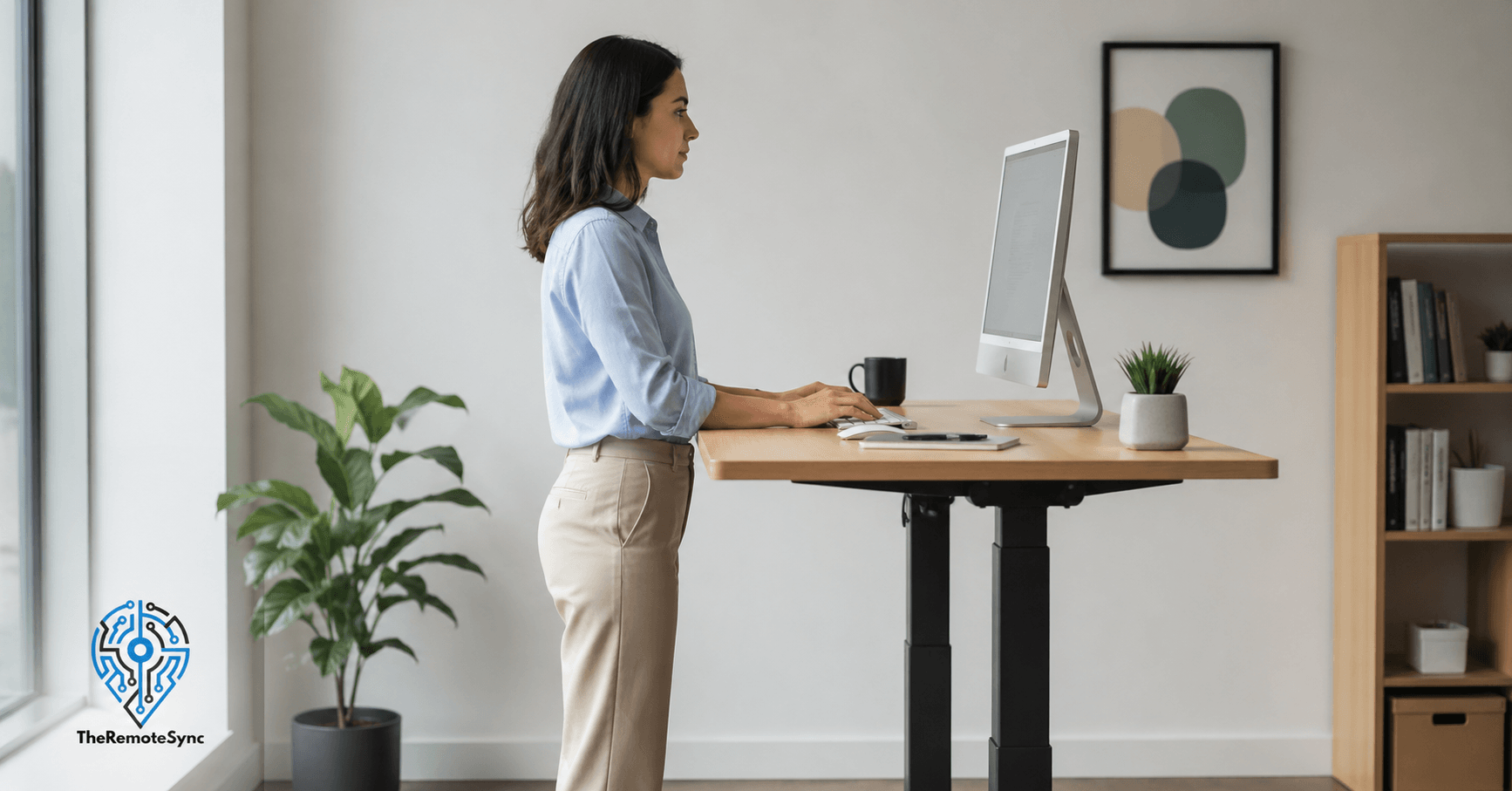
When sitting, your forearms should be roughly parallel to the floor with your elbows at a 90-degree angle. Your monitor screen should be at eye level, with the top of the display roughly level with your eyebrows. When standing, the same rules apply. If your monitor height doesn’t change when the desk rises, you’ll need a monitor arm to maintain that alignment.
Do not eyeball this. Measure it once, set it correctly, and save the height as a memory preset if your desk supports it.
The Anti-Fatigue Mat
An anti-fatigue mat for standing desk use is not optional if you plan to stand for more than 30 minutes at a stretch. These mats work by creating subtle instability that keeps your leg muscles slightly engaged, which reduces fatigue and foot discomfort. A decent mat costs between $50 and $150 and significantly extends how long you can stand comfortably before needing to sit.
Footwear Matters More Than Most Guides Admit
Standing barefoot or in thin-soled shoes on a hard floor accelerates fatigue and can aggravate plantar fasciitis over time. If your home office setup involves standing at a desk, wear supportive footwear or use the anti-fatigue mat without shoes. This is one of the more practical, commonly overlooked details that make the experience noticeably better.
Standing Desk vs Regular Desk: Who Should Actually Buy One
Not everyone needs a height-adjustable desk. Here’s a direct breakdown.
A standing desk makes sense if you:
- Sit for more than five hours a day at your desk consistently
- Already experience lower back, neck, or shoulder discomfort from your current setup
- Have the discipline to actually adjust the desk throughout the day
- Have a budget of at least $450 to $500 for a quality electric unit
- Work from home full-time or are a hybrid worker who uses their home setup heavily
A regular desk is fine if you:
- Take regular breaks and walk frequently during the day
- Already have an ergonomic chair, proper monitor height, and a good seated setup
- Spend fewer than four hours a day at your desk
- Have a tight budget and would have to compromise significantly on desk quality
The standing desk vs regular desk question isn’t really about which is better. It’s about whether the benefits are worth the cost and habit change for your specific situation.
Is a Standing Desk Converter Worth It?
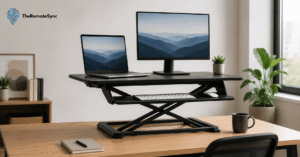
If you’re not ready to commit to a full electric desk, a standing desk converter is worth considering. These units sit on top of your existing desk and raise your monitor and keyboard when you want to stand.
The trade-offs are real, though.
Most converters move the monitor and keyboard together. That means achieving perfect ergonomic alignment at both heights is harder than with a full desk, where you can independently position everything. They also reduce available desk surface area, which matters if you have a multi-monitor setup or a lot of equipment.
That said, a converter in the $150 to $300 range is a reasonable way to test whether you’ll actually use the sit-stand function before investing in a full desk. If you use it consistently for two to three months and find yourself genuinely alternating positions, upgrade to a proper desk. If it gathers dust, you’ve learned something useful for a fraction of the price.
Can a Standing Desk Help With Productivity?
Carefully, yes. But not in the way the marketing suggests.
Standing doesn’t make you smarter or more focused. What it does is reduce the physical discomfort and fatigue that quietly erode your attention over the course of a long workday. When your back stops aching and your energy levels are more consistent, it’s easier to maintain output across an eight-hour day.
The productivity benefit is indirect and cumulative. It’s not something you’ll notice on day one. It’s something you notice after six weeks when you realize your afternoon slump is less severe and you’re ending the day with more mental capacity than you used to.
For remote workers specifically, the benefit is amplified by the lack of natural movement breaks that office environments provide. When you work from home, you can go hours without leaving your desk. A sit-stand desk introduces a small but consistent nudge to change positions, which breaks the physical monotony that kills focus over time.
How to Choose the Best Standing Desk for Remote Workers
If you’ve read this far and decided a standing desk is right for you, here’s what actually matters when buying.
Motor quality and stability: Look for a dual-motor desk. Single-motor desks often wobble at full height, especially with heavier setups. Dual-motor desks move more smoothly, handle more weight, and last longer. This is the single most important spec to check.
Height range: Make sure the desk’s minimum and maximum heights actually match your sitting and standing positions. Taller individuals (over 6 feet) often find that budget desks don’t extend high enough for a proper standing posture. Measure your ideal standing elbow height before buying.
Memory presets: You want to be able to save your sitting and standing heights and switch between them with one button press. If adjusting the desk height takes more than three seconds, you’ll stop doing it.
Warranty: A quality desk should come with at least a five-year warranty on the frame and motor. Desks with shorter warranties often cut corners on component quality. Some premium brands offer 10 to 15 years. That’s the tier to aim for if you’re spending $700 or more.
Surface size: For a home office with multiple monitors, a keyboard, and other accessories, a surface of at least 55 inches wide is practical. Smaller desks create clutter, which forces awkward posture adjustments.
Frequently Asked Questions
How often should you stand up from your desk?
Follow the 20-8-2 rule: for every 30 minutes at your desk, spend 20 minutes sitting, 8 minutes standing, and 2 minutes actually moving, walking, stretching, or just standing up and sitting back down deliberately. It’s not a rigid formula, but it shifts the goal from “stand more” to “move more,” which is what actually reduces back pain and fatigue.
Do standing desks actually make a difference?
Yes, for remote workers who spend six or more hours a day at a desk. The difference shows up in specific, measurable ways: reduced end-of-day fatigue, fewer back pain flare-ups, especially if you already have lower back issues, and steadier mood and alertness through the day. It’s not a dramatic transformation, and the improvement is proportional to how consistently you actually use the height adjustment.
What are the downsides of using a standing desk?
The adaptation period is real, your legs and feet will fatigue quickly in the first two to four weeks. A poor setup creates new problems: if your monitor doesn’t rise with the desk, you’ll develop neck strain instead of fixing back pain. Cheaper desks under $300 often wobble at full height, and a quality desk that won’t have these issues costs $500 to $1,000, plus $50 to $150 more for an anti-fatigue mat.
What is the 20-8-2 rule for standing desks?
For every 30 minutes at your desk, spend 20 minutes sitting, 8 minutes standing, and 2 minutes moving, whether that’s walking, stretching, or just changing position. It’s a practical default rather than a strict rule, and the 2 minutes of actual movement may matter as much as the standing itself.
Was a standing desk worth it in the long run?
It tends to be, but only for people who actually meet three conditions: they sit for long stretches with limited movement, they have a specific problem it can address like back pain or afternoon energy crashes, and they’re realistic about building the habit of using the height adjustment consistently. For someone who already has an ergonomic seated setup and takes regular breaks, the long-term improvement is marginal at best.
The Bottom Line on Are Standing Desks Worth It
A standing desk is worth it if you meet three conditions.
You sit for long stretches with limited movement. You have a specific problem it can actually address, such as back pain, afternoon energy crashes, or posture issues. And you’re realistic about building the habit of actually using the height adjustment function throughout the day.
If those three things are true, a quality sit-stand desk will make a consistent, noticeable difference to how you feel during and after your workday.
If you’re buying one because it seems like the right thing to have in a home office, but your current setup is already ergonomic and you take regular movement breaks, the improvement will be marginal at best.
The research supports it. The real-world experience of most remote workers who use one consistently supports it. But it’s not passive. The desk doesn’t work if you don’t use the feature it’s built around.
Ready to set one up? Start with your measurements before you buy anything.
Measure your ideal sitting and standing elbow heights, check the height range on any desk you’re considering, and factor in a monitor arm and an anti-fatigue mat from the beginning. Those two add-ons are what separate a desk that helps from one that collects dust at sitting height.