Most remote workers hit the same wall around month three of working from home. The back starts nagging. The neck stiffens up by 2 PM. You keep adjusting your chair, but nothing quite fixes it. At some point, someone suggests a riser desk, and you are not entirely sure what that means or whether it is actually worth the money.
This article breaks it down: what a riser desk is, how it works, which type fits different setups, and whether it makes sense for your home office.
What Is a Riser Desk?
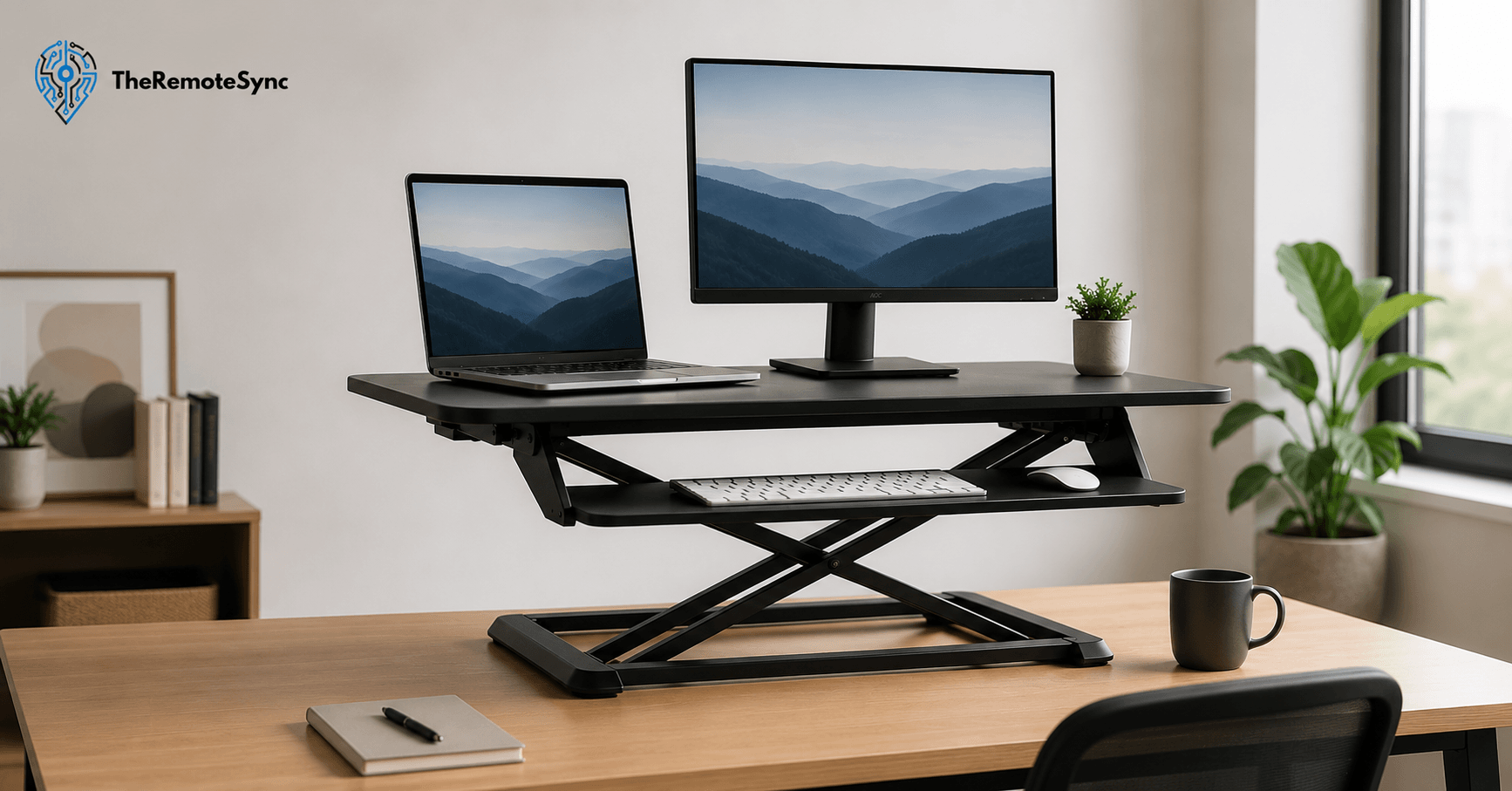
A riser desk, also called a standing desk converter or desk converter, is a platform you place on top of your existing desk. It raises your monitor, keyboard, and mouse to a standing-height position, so you can alternate between sitting and standing without replacing your furniture.
That is the core of it. You are not buying a new desk. You are adding height-adjustable capability to the one you already have.
Most riser desks have two levels:
- A top shelf for your monitor — this is where your screen sits at eye level when you are standing
- A lower keyboard tray — this keeps your elbows at a roughly 90-degree angle, whether you are sitting or standing
The whole unit moves up and down together. You raise it when you want to stand, lower it when you sit, and go back to your regular workday.
What Is a Desk Riser Called? (And Why the Names Get Confusing)
If you have searched for this product and gotten confused by the terminology, you are not alone. A riser desk goes by several names depending on the brand and context:
- Desk riser — the most common shorthand
- Standing desk converter — describes the function (converting a regular desk into a sit-stand desk)
- Desk converter — a shorter version of the above
- Sit-stand desk converter — sometimes used to emphasize the alternating sitting and standing function
- Desktop riser — used by some brands to distinguish smaller, single-monitor platforms
These all refer to the same category of product. The naming varies by brand, but if you see any of these terms, they are describing the same thing: a platform that sits on your desk and adds height adjustability.
How Does a Desk Riser Work?
The mechanics depend on the type you buy, but the principle is the same across all of them. The platform has a lifting mechanism that lets you raise or lower it quickly during the workday.
Manual (Pneumatic or Spring-Assisted)
The most common type. You squeeze a lever or handle, and a gas-powered spring lifts the platform smoothly. Release it at the height you want, and it locks in place. No electricity needed. Fast to adjust and reliable for most users.
Electric (Motorized)
You press a button, and the desk rises or lowers automatically. Some models include programmable height presets, so you can return to your exact sitting or standing height with one touch. More convenient, but heavier, more expensive, and requires a power outlet nearby.
Manual Crank or Lever
The most affordable option. You turn a crank or push a lever to adjust the height. More effort is required, which means most people adjust less often. Fine for occasional changes, but not ideal if you plan to switch between sitting and standing multiple times per day.
Types of Riser Desks Explained
Not all desk risers are built the same. The type you choose affects your available workspace, stability, and ergonomic outcome.
Dual-Tier Riser (the Standard Pick)
This is the most popular design for a reason. The monitor shelf and keyboard tray are separate levels, which means you can position both your screen and your hands at the correct ergonomic height simultaneously.
When remote workers ask about riser desks, this is usually what they end up with. It handles single and dual monitor setups well and works for most standard home office desks.
Single-Tier Riser
One flat platform that raises everything together: your laptop, monitor, and sometimes your keyboard. The problem is ergonomic: when the screen is at the right height, your keyboard is too high. When the keyboard is right, your screen is too low. Fine for occasional use, but not recommended for full workdays.
Full-Width Riser
Spans most or all of the width of your desk surface. Better for large setups with two or three monitors, or if you need more horizontal working space. Takes up more of your desk footprint, so it works best on desks that are 60 inches or wider.
Compact Riser
A smaller footprint, designed for tight workspaces, cubicles, or desks under 48 inches. Supports one monitor and a standard keyboard. Good for a desk riser for small home office use, where you cannot afford to lose desktop real estate.
Riser Desk vs Standing Desk: What Is Actually Different?
This is the most common question people have once they understand what a riser desk is. The confusion is understandable because both products let you stand while you work.
The difference comes down to structure.
A standing desk (also called a sit-stand desk or height-adjustable desk) is a complete workstation. The entire desk frame rises and falls. Your whole surface moves with you. It replaces your current desk entirely.
A riser desk sits on top of your current desk. It only raises the area where your monitor and keyboard sit. The rest of your desk surface stays fixed.
Here is how that plays out practically:
Where a riser desk wins:
- You keep your existing desk, which saves several hundred dollars
- Setup is immediate; most models require no assembly
- Works well in rental situations or small apartments where a full desk swap is not practical
- Easier to try standing work without committing to a furniture overhaul
Where a standing desk wins:
- Your entire work surface moves, so papers, notebooks, and peripherals all stay accessible at the right height
- Cleaner aesthetics and no bulk sitting on top of the desk
- Better for heavy multi-monitor setups, where a riser platform can feel unstable
- The better long-term investment if you work from home full-time
For a first-time remote worker setting up a home office on a budget, the riser desk is the more practical starting point. For someone who has been working from home for more than a year and is committed to their setup, a full standing desk often makes more sense over time.
Is a Desk Riser Worth It?
That depends on how you are currently working and what problem you are trying to solve.
If you sit for six or more hours a day with no movement, a desk riser will make a noticeable difference. Research published in the British Journal of Sports Medicine found that office workers who used sit-stand desks reported less back pain and fatigue compared to those who remained seated all day. The benefit comes from movement and posture variation, not from standing itself.
The caveat: a riser desk only helps if you actually use it. Many people buy them, raise them for a few days out of novelty, and then leave them in the lowered position permanently. If that sounds like you, the problem is not the equipment. It is a habit.
A desk riser is worth it if:
- You have back or neck pain from prolonged sitting. Alternating positions every 30 to 60 minutes reduces compressive load on the spine and can ease tension in the neck and shoulders.
- You work from home and do not want to replace your desk. It is the most cost-effective way to add sit-stand functionality to a setup you already have.
- You are new to standing work and want to test it before investing in a full standing desk. A riser desk gives you a low-risk way to find out if standing at work actually works for you.
A desk riser is probably not worth it if:
- Your desk is already small. A riser takes up real estate on your desktop. On a desk under 40 inches, a riser can feel cramped and leave you with almost no flat surface outside the platform.
- You have a heavy multi-monitor setup. Stability becomes an issue at full extension if you are running two large monitors. Some risers wobble at height, which is distracting and hard on the equipment.
- You already know you want a permanent standing solution. If you work from home full-time and plan to stay in your current space long-term, the price difference between a quality riser and an entry-level electric standing desk has narrowed enough that the desk is often the smarter investment.
Desk Riser Benefits: What the Research and Real-World Use Actually Show
The marketing around riser desks tends to oversell the benefits. Standing at a desk will not transform your productivity or eliminate back pain overnight. What it does do, when used consistently, is reduce the amount of time you spend in one fixed position, which has real health effects over time.
Reduced Back and Neck Pain
This is the most commonly cited benefit, and it holds up in practice. Prolonged sitting compresses the lumbar spine and tightens the hip flexors. Switching to standing, even briefly, shifts the load and reactivates the muscles that support your posture.
For remote workers who spend 8 or more hours in front of a screen, this is the most immediate and noticeable benefit. The change is not dramatic, but after a few weeks of alternating positions consistently, most people notice less stiffness at the end of the day.
Better Posture Awareness
When you stand, bad posture is harder to ignore. Slouching is easy in a chair. Standing makes you more aware of where your shoulders are and how your neck is positioned. A properly set-up desk riser, where the monitor is at eye level, and the keyboard is at elbow height, reinforces better posture simply by making good positioning the path of least resistance.
More Movement Throughout the Day
Standing itself is not the goal. Movement is. A riser desk gives you a reason to shift positions multiple times per day, which keeps blood circulating and prevents the kind of deep fatigue that comes from sitting in one spot for hours. Most remote workers who use a desk riser also end up taking more short breaks, doing quick stretches, or moving around the room more often because the act of raising the desk becomes a cue for the whole pattern.
Lower Upfront Cost Compared to a Full Standing Desk
A decent dual-tier desk riser starts around $150 to $200. A quality electric standing desk starts closer to $400 to $600. If you are setting up a work-from-home or hybrid workspace for the first time and are not sure whether standing work will suit you, the cost difference is meaningful.
How to Use a Desk Riser Properly
Buying a riser desk is the easy part. Setting it up correctly is where most people get it wrong.
Get the Monitor Height Right
The top third of your screen should be at or just slightly below eye level when you are standing. If you find yourself tilting your chin up to see the screen, the platform is too low, or your monitor is too small for the setup. If you are looking down sharply, the platform is too high.
Most people underestimate how high a monitor needs to be when standing. Measure your eye height when standing, and set your screen accordingly before you start using the riser.
Set the Keyboard Tray to Elbow Height
Your forearms should be parallel to the floor or angled slightly downward when your hands are on the keyboard. If your elbows are above the tray, the riser is too high. If your shoulders are hunched up, it is too low. This is separate from the monitor height, which is why a dual tier desk riser matters because you can fine-tune both independently.
How Long Should You Stand at a Desk Riser?
This is one of the most common questions, and the answer most people do not expect: not that long. Start with 20 to 30 minutes of standing per hour. Stand, then sit, then stand again. The goal is variation, not endurance. Standing for three hours straight is not better for you than sitting for three hours straight. The benefit is in the switching.
A practical approach: stand during calls and focus on writing. Sit during tasks that require precision or deep concentration. Build the habit gradually over two to three weeks rather than trying to stand for half your workday from day one.
Use an Anti-Fatigue Mat
If you do not have one, get one before you start using your riser desk regularly. Standing on a hard floor for 30-minute intervals over the course of a workday adds up quickly. An anti-fatigue mat reduces foot and leg fatigue and makes it easier to maintain the habit long-term. You do not need to spend a lot on this. A basic mat in the $30 to $50 range is enough.
How to Set up a Desk Riser Ergonomically: A Quick Checklist
Before you start using your riser in earnest, run through these checks:
- Monitor at eye level. Measure standing eye height. Adjust screen height to match.
- Keyboard tray at elbow height. Forearms parallel to the floor or slightly downward.
- Screen distance at arm’s length. Sit an arm’s length away from your monitor when standing.
- No glare on the screen. Standing shifts your viewing angle. Check that windows or overhead lights are not creating new glare you did not have when seated.
- Anti-fatigue mat in place. Position it directly in front of the riser before your first standing session.
- Cable slack accounted for. When you raise the platform, your cables need enough slack to travel with it. Check this before you use the riser at full height for the first time.
Keyboard Tray Depth: What to Look for When Buying a Desk Riser for Home Office Use
This is not a product roundup, but if you are shopping for a riser desk as a remote worker or WFH setup, these are the specs that actually matter.
Weight Capacity
Check the listed weight limit against the total weight of your equipment. A single 27-inch monitor can weigh 12 to 15 pounds. Add a second monitor, and you are approaching or exceeding the limit on budget-tier risers. If you run a dual-monitor setup, look for a riser rated at 35 pounds or more.
Height Range
The riser needs to reach your standing eye height. Most platforms have a height range listed (for example, 5 inches to 20 inches above the desk surface). Add your desk height to the top of that range to get the maximum total monitor height. If that number is below your standing eye height, the riser will not work for you at standing height.
Keyboard Tray Depth
Some keyboard trays are barely wide enough for a keyboard alone. If you use a full-size keyboard with a number pad, or if you prefer a mouse with a wide pad, check the tray dimensions before buying. A tray under 20 inches wide is going to feel cramped for most setups.
Stability at Full Extension
This is hard to assess from a product page. Look for user reviews that specifically mention wobble at standing height. Gas spring risers tend to be more stable than manually adjusted lever-style ones. If you are buying a budget-tier riser, test it at full height before loading it with your equipment.
Price Range
For a basic but functional dual-tier gas spring riser, expect to spend $150 to $250. If you want a standing desk converter under $200 with decent build quality, the FlexiSpot M2B and Vivo DESK-V000E are two commonly cited options in that price range. Above $300, you start getting electric models with programmable presets.
Who Actually Benefits From a Riser Desk?
Not everyone needs one. Here is a clear breakdown.
Remote workers who sit at a fixed desk all day. This is the primary use case. If you are logging six or more hours in a seated position five days a week with no other movement, a riser desk for remote workers provides an easy, low-disruption way to introduce position variation.
Hybrid workers in an office that does not have adjustable desks. If your company office has standard fixed-height desks and you split time between home and office, a compact riser is easy to bring in and set up. Many compact models do not require any tools.
People dealing with lower back pain or neck strain. If your pain is directly related to prolonged sitting, a riser desk can reduce symptoms over time when paired with the correct ergonomic setup. It is not a medical solution, but it is a practical one.
People who are not ready to invest in a full standing desk. If you are testing whether standing work suits you before spending $500 or more on a full electric standing desk, a riser is the right starting point.
Who should probably skip it:
Someone who already has a small desk and needs every inch of surface space. Someone running a heavy three-monitor setup that a riser platform cannot safely support. Someone who is already getting regular movement throughout the day and is not experiencing posture-related issues.
Riser Desk vs Full Standing Desk for Posture: The Honest Comparison
Both options improve posture compared to a fixed seated desk. The difference is in how well they do it and for whom.
A full standing desk moves your entire work surface. Papers, notebooks, and side peripherals all adjust with you. There is no awkward split between a raised platform and a fixed desktop. The ergonomics are cleaner and more consistent.
A riser desk for posture improvement works best when your work is screen-centric. If most of your day is monitor and keyboard time, the riser covers the elements that matter most. If you regularly use the full desk surface for writing, drawing, or reviewing printed documents, the fixed desktop outside the riser becomes an ergonomic problem every time you switch positions.
One thing that does not get talked about enough: a riser desk raises the keyboard and monitor, but it does not raise your chair. When you sit back down after standing, your monitor is lower than the riser platform. If the riser does not lower completely flat, there can be a height difference between your monitor when sitting versus when you are standing. Set your monitor height for seated use as the baseline and adjust the riser for standing height, not the other way around.
Frequently Asked Questions About Riser Desks
What is a riser desk?
A riser desk, also called a standing desk converter or desk converter, is a platform you place on top of your existing desk. It raises your monitor, keyboard, and mouse to a standing-height position, so you can alternate between sitting and standing without replacing your furniture. Most have two levels: a top shelf for the monitor and a lower tray for the keyboard.
Can a desk riser work on any desk?
Most desk risers are designed to sit on a flat surface and rely on their own weight for stability. They work on the majority of standard desks. The exceptions are desks with a curved or beveled front edge (some risers will not sit flat), glass-top desks (stability can be an issue), and desks under 20 inches deep (not enough surface area to support the riser base).
Is a desk riser worth it?
It’s worth it if you sit for six or more hours a day with limited movement, want to test standing work before committing to a full standing desk, or want sit-stand functionality without replacing your desk. It’s probably not worth it if your desk is already small, you run a heavy multi-monitor setup that needs more stability than a platform can offer, or you already know you want a permanent standing solution, since the price gap to an entry-level standing desk has narrowed.
What is the difference between a standing desk and a desk riser?
A standing desk is a complete workstation where the entire desk frame and surface rise and fall together, replacing your current desk. A riser desk sits on top of your existing desk and only raises the area where your monitor and keyboard sit, while the rest of your desk surface stays fixed. The riser saves money and sets up immediately, while the standing desk gives you a cleaner, more consistent setup, especially for heavier multi-monitor configurations.
What is the purpose of a desk riser?
The main point is reducing the amount of time you spend in one fixed position. A desk riser sits on top of your existing desk and raises your monitor, keyboard, and mouse to standing height, giving you an affordable, non-disruptive way to alternate between sitting and standing throughout the day without replacing your furniture.
Desk riser vs riser desk?
They’re the same thing. Desk riser, riser desk, standing desk converter, desk converter, desktop riser, and sit-stand desk converter all describe the same category of product. The naming varies by brand, but each refers to a platform that sits on your desk and adds height adjustability.
What are the different types of rising desks?
Four main types exist. A dual-tier riser has a separate monitor shelf and keyboard tray, and is the standard pick for most setups. A single-tier riser raises everything on one flat platform, which creates an ergonomic tradeoff between screen and keyboard height. A full-width riser spans most of the desk and suits larger multi-monitor setups. A compact riser has a smaller footprint built for tight desks or cubicles.
Conclusion
A riser desk is a practical, low-cost way to start standing at work without replacing your furniture. It works best for remote workers and WFH setups where screen-based work dominates the day and budget or space constraints make a full standing desk a harder sell.
The key is using it correctly. Set your monitor at eye level when standing, get your keyboard tray at elbow height, and alternate between sitting and standing every 30 to 60 minutes rather than trying to stand for long unbroken stretches.