If your lower back hurts after a full day of remote work, you have probably already tried sitting up straighter. Maybe it helped for an hour. Then you drifted back into the same position, and the ache came back.
Here is what most posture guides miss: the problem is rarely just the shape you are sitting in. It is that you are sitting in that shape for too long without moving. That distinction matters because it changes what you actually need to fix.
This guide covers the mechanics behind why your lower back hurts, what the best sitting posture for lower back pain actually looks like in practice, the common mistakes that undo it, and the movement habits that make a real difference over time.
Why Your Lower Back Hurts When You Sit
Your spine has a natural S-curve. When you sit, especially for hours, that curve tends to flatten or reverse. The lumbar region at the base of your spine takes the most load, and when that natural curve disappears, the surrounding muscles and discs compensate. Over time, that compensation becomes pain.
There are two specific patterns that are common in remote workers:
Forward head posture. You lean toward the screen. Your head, which weighs around 10 to 12 pounds at neutral, starts to act like it weighs significantly more as it moves forward. The tension this creates travels down through your upper back and into your lumbar region. If you have been dealing with neck tightness alongside lower back pain, this is likely part of the chain. Our guide on tech neck exercises covers this in detail if you want to address both ends at once.
Anterior pelvic tilt. Sitting shortens your hip flexors over time. Tight hip flexors pull your pelvis forward, which overarches your lower back when you stand. When you sit back down, it creates compression in the lumbar discs. This is one of the most common and most underdiagnosed drivers of lower back pain in people who sit for work.
The bigger point: even a technically “correct” sitting position causes problems if you hold it without moving for hours. Research published in Applied Ergonomics found that sustained static sitting increases disc pressure and muscle fatigue regardless of posture quality. Movement is not optional. It is part of the fix.
What Good Sitting Posture Actually Looks Like
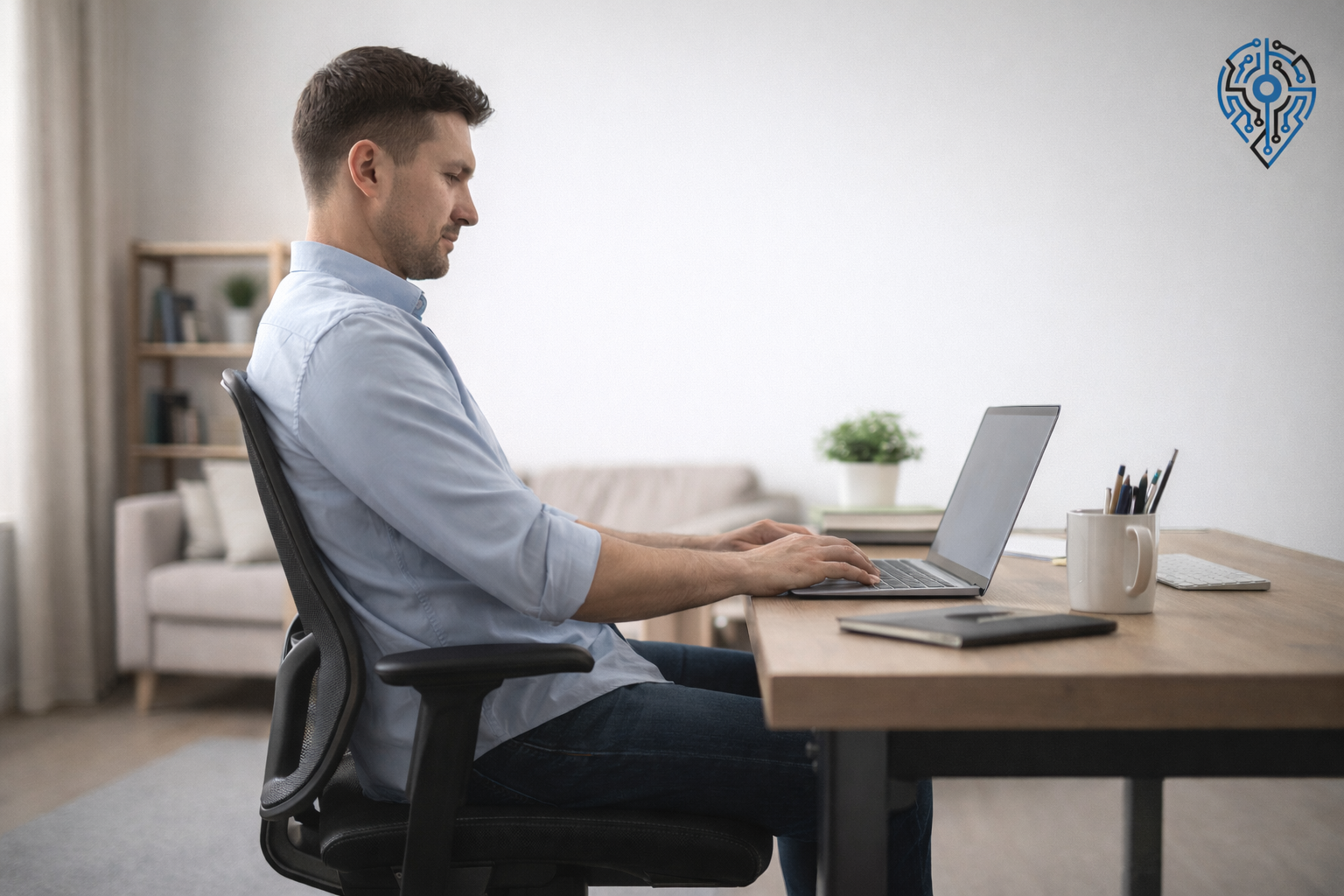
The 90-90-90 guideline is widely referenced because it works as a starting point. It is not a rigid rule, but it gives you a repeatable baseline to return to when you notice you have drifted.
Feet, Knees, and Hips
Start from the ground up. Your feet should be flat on the floor with your ankles at roughly 90 degrees. This gives you a stable base and keeps your pelvis level.
Your knees should be at hip level or just slightly below. When your knees are higher than your hips, your pelvis tilts backward, which rounds your lower back. If your chair is too high for your desk, a footrest solves this without forcing you to compromise somewhere else.
Your hips should be at a 90 to 100 degree angle. Sitting at 100 degrees, which is a very slight recline, is actually easier on the lumbar spine than sitting perfectly upright. It reduces compression on the discs. If your chair allows it, a slight backward tilt is worth using.
Lower Back and Lumbar Support
Your lumbar spine needs to maintain its inward curve when you sit. Most people lose it by either slumping (which rounds the lower back outward) or by perching on the edge of the seat (which is unsustainable).
The lumbar support on your chair should sit at the curve of your lower back, roughly at belt level. It should fill the gap between your back and the chair, not push you forward. If your chair has no adjustable lumbar support, a rolled towel or small lumbar pillow placed at that zone works well enough.
Shoulders and Arms
Your shoulders should be relaxed, not raised. If your desk is too high, your shoulders naturally hike up to meet the keyboard, which loads the upper traps and creates that burning neck tension that tends to show up by early afternoon.
Elbows should be at roughly 90 degrees with your forearms parallel to the desk. Keep your keyboard and mouse close enough that you are not reaching forward to use them. Every inch you reach forward pulls your spine out of alignment.
Monitor Height
The top of your screen should be at or just below eye level. Looking up at a screen strains the back of the neck. Looking too far down pulls the head forward. The goal is to be able to look at the center of the screen with a very slight downward gaze and a neutral neck. A laptop stand paired with an external keyboard solves this if you are working from a laptop.
The Mistakes That Undo Good Posture
You can set everything up correctly and still end up in pain if you repeatedly fall into these patterns.
The slump. This is the most common one. You start well, then slowly slide down in the chair over the course of an hour. Your lower back rounds out, your head moves forward, and your hips slide to the front of the seat. The fix is not just to sit back up. It is to reset: stand up, sit back down, and push your hips all the way to the back of the chair before continuing.
Crossing your legs. One hip lifts higher than the other. Your pelvis tilts. Over weeks and months, this creates asymmetrical loading on the lower back and can contribute to SI joint discomfort. If you habitually cross your legs, it often means your chair height is slightly off, or you are not comfortable sitting with both feet flat. Adjust the chair first.
Chin jutting forward. You recognize this one because by the end of the day, your neck feels stiff at the base. A chin tuck resets it: pull your chin straight back, as if making a double chin, and hold for three seconds. Do this a few times throughout the day, not just when it hurts.
Sitting in one position too long. Even if your posture is textbook, staying completely still for 90 minutes loads the same structures continuously. Your muscles fatigue, your discs compress, and your blood flow slows. This alone can cause pain.
The Movement Habit That Makes Everything Else Work
If there is one thing that will make the biggest difference alongside good posture, it is this: you need to break up prolonged sitting with intentional movement, not just standing.
A practical cycle to follow is 20 minutes sitting, 8 minutes standing, 2 minutes moving. The moving part matters more than most people realize. Walking to get water, doing a brief stretch, or even walking to another room and back is enough to reset circulation and reduce muscle fatigue.
If you do not have a standing desk, simply standing up every 30 minutes and doing a brief walk counts. The threshold is low. It just has to be consistent.
Four Stretches That Directly Address Lower Back Pain From Sitting
These are not general wellness stretches. Each one targets a specific mechanism that prolonged sitting worsens.
Seated cat-cow. Sit on the edge of your chair. Inhale and arch your back, lifting your chest and looking slightly upward. Exhale and round your spine, tucking your chin and pulling your belly in. Repeat five times. This moves the lumbar vertebrae through their full range and reduces the stiffness that builds from static loading.
Figure-four hip stretch. Cross your right ankle over your left knee. Keeping your back straight, lean forward gently until you feel a stretch in the right hip and glute. Hold for 30 seconds and switch sides. This directly addresses the hip tightness that drives anterior pelvic tilt.
Doorway chest stretch. Stand in a doorway with your forearms resting on the frame at shoulder height. Lean forward gently until you feel a stretch across your chest. Hold for 30 seconds. Sitting pulls your shoulders forward and tightens your chest muscles. This reverses that.
Decompression hang. If you have a pull-up bar, hang from it with relaxed shoulders for 20 to 30 seconds. Gravity gently creates space between your lumbar vertebrae. People who try this consistently report that it is one of the more immediately effective things for lower back tension relief.
For a broader set of desk-friendly exercises, our posture correcting workouts guide covers ten movements you can do without leaving your workspace.
When Posture Is Not the Problem
If you have adjusted your setup, added movement breaks, and addressed your posture, but the pain persists or worsens, it is worth taking that seriously.
Signs that warrant a visit to a physiotherapist or physician:
- Pain that radiates down one or both legs
- Numbness or tingling in the legs or feet
- Weakness in the feet or legs
- Pain that does not change with position
- Loss of bladder or bowel control (this is a medical emergency, not a posture problem)
A physiotherapist can identify whether the issue is muscular, structural, or a nerve compression that no amount of posture adjustment will fix. If you have been living with lower back pain for more than a few weeks, getting a proper assessment is the most efficient use of your time.
Frequently Asked Questions
What is the best way to sit for back pain?
Keep your feet flat on the floor, knees at or just below hip level, and hips at a 90 to 100 degree angle. Your lumbar support should fill the curve of your lower back at belt level. But posture alone isn’t enough; you need to break up sitting with movement every 20 to 30 minutes to actually prevent pain.
Is it better to sit up straight or lean back for lower back pain?
A slight recline, around 100 degrees at the hips, puts less pressure on your lumbar discs than sitting perfectly upright. It’s a small adjustment, but it meaningfully reduces compression compared to a rigid 90-degree posture.
How often should I stand up if I have lower back pain from sitting?
Stand up at least every 30 minutes. A more effective pattern is 20 minutes sitting, 8 minutes standing, and 2 minutes of actual movement, like walking to get water. The movement matters more than the standing itself; it resets circulation and reduces muscle fatigue.
What is the 90-90-90 rule for sitting posture?
It’s a baseline for sitting posture: ankles at 90 degrees with feet flat, knees at 90 degrees and level with your hips, and hips at roughly 90 degrees. It’s not a rigid target, but it gives you a repeatable position to return to when you notice yourself slumping.
Can bad posture alone cause lower back pain?
Not entirely. Even correct posture causes pain if you hold it without moving for hours. Static sitting increases disc pressure and muscle fatigue regardless of how well-aligned you are, so posture and movement need to be addressed together, not separately.
What’s the fastest way to relieve lower back pain from sitting?
A decompression hang, hanging from a pull-up bar with relaxed shoulders for 20 to 30 seconds, tends to give the most immediate relief by creating space between the lumbar vertebrae. For ongoing prevention, the figure-four hip stretch and seated cat-cow are more effective daily habits.
When should I see a doctor for lower back pain from sitting?
See a physiotherapist or physician if pain radiates down your legs, you notice numbness, tingling, or weakness in your legs or feet, or the pain doesn’t change with position. Loss of bladder or bowel control is a medical emergency and needs immediate attention.
What to Actually Do Starting Today
Here is a quick-start summary if you want to act on this without rereading everything:
- Adjust your chair so your feet are flat, knees are at or below hip level, and lumbar support fills the curve of your lower back
- Set your monitor so that the top edge is at eye level
- Keep your keyboard and mouse close enough that your elbows stay at your sides
- Set a reminder to stand up every 30 minutes, even if only for two minutes
- Add the figure-four hip stretch and seated cat-cow to your daily routine, even on good days
The posture adjustment takes ten minutes. The movement habit takes consistency. Both are necessary. Neither alone is enough.